
Freelime app icon

Mac menu bar app · Not on sale yet

Track time in the menu bar. Bill from your notes.

Freelime is a native Mac time tracker for freelancers and consultants who bill by the hour. Start the timer with one click, write what you did with the hours you bill, and send your client a clean summary. No account and no Freelime server for your data: it lives on your Mac, backed up to your own iCloud Drive.

Free to join. Freelime isn't on sale yet and the price isn't set.

Freelime in the menu bar: a pause button in the task's color next to the running time on a sage tile.
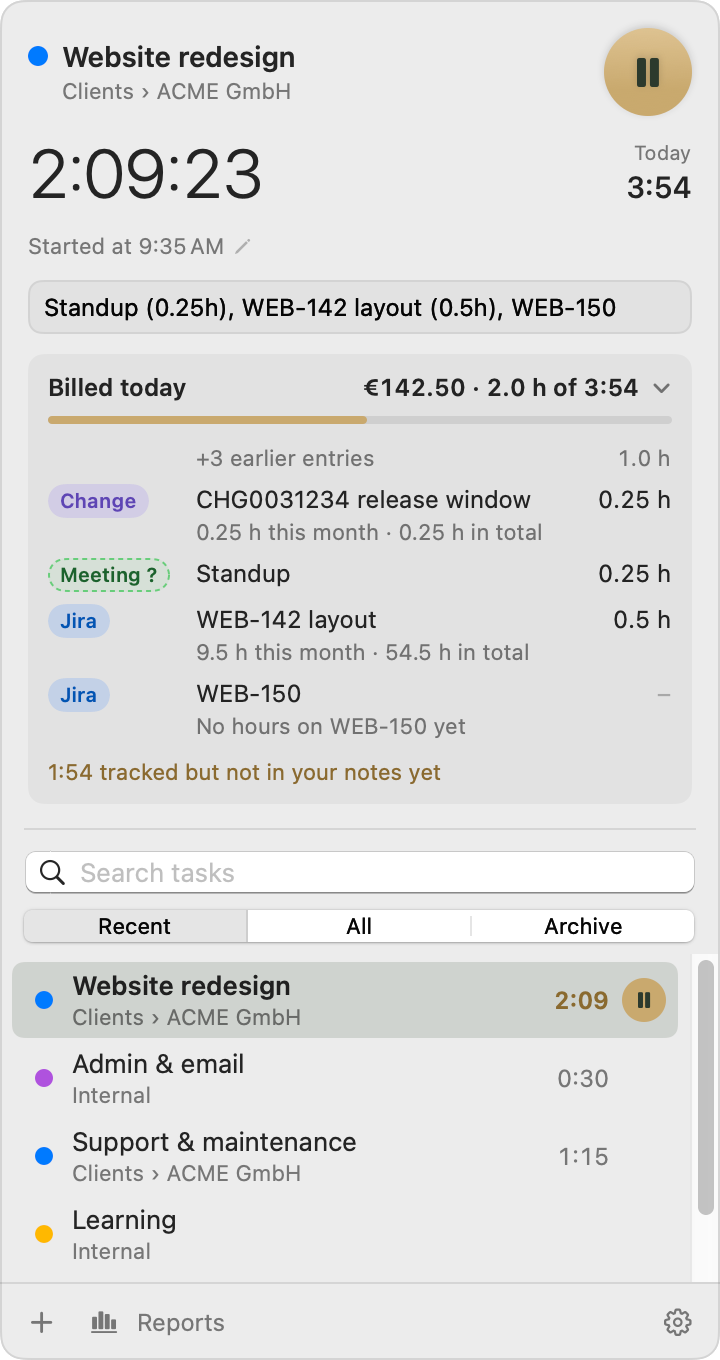
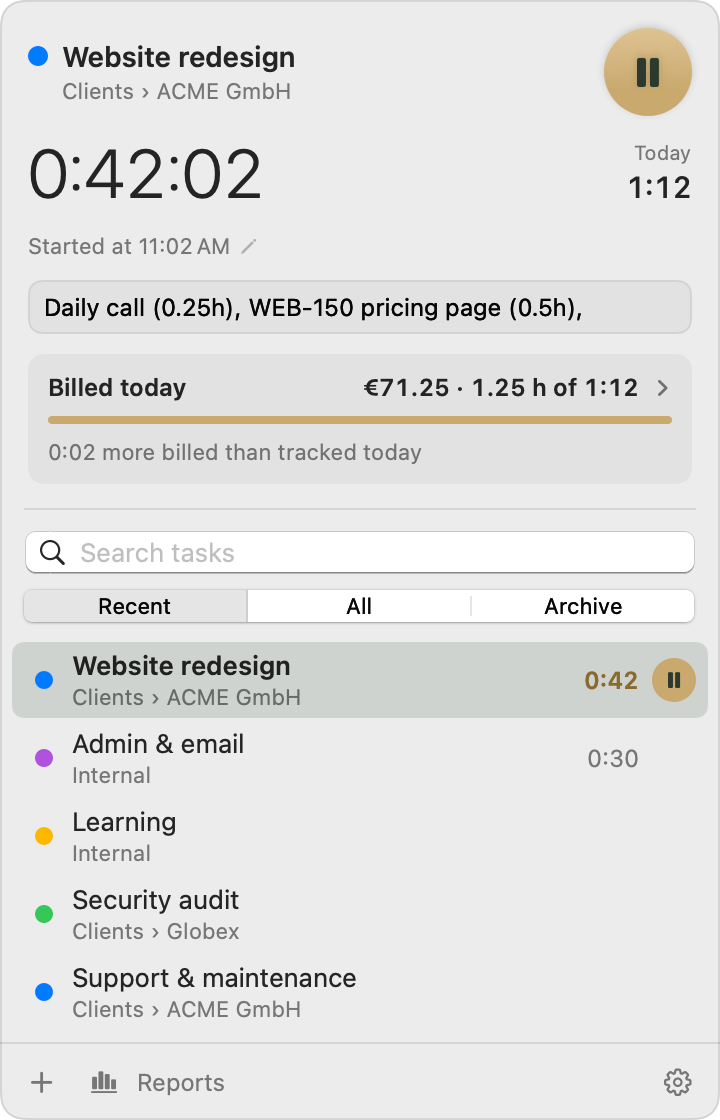
Freelime's menu bar panel with the timer running on Website redesign for ACME GmbH and notes listing billable hours.

Names and amounts in the screenshots are sample data.

Why Freelime

Tracking time is the easy part.

The real work starts when a client wants to know what the hours were for.

  • The timer doesn't know you left.

    Lunch, a long call, a Mac that went to sleep — and the day's total is wrong.

  • What you did and what you bill drift apart.

    Notes in one app, hours in another, the invoice in a third.

  • Clients want it their way.

    Per ticket, per ID, per week — in a form they can paste into their own sheet.

  • Budgets live in spreadsheets.

    Updated by hand, when you remember.

Freelime keeps it all in one small place. The timer in your menu bar is your check. The notes you write anyway, with the hours you bill, become your reports, your client summaries and your budgets.

Made for freelancers and consultants on the Mac who bill by the hour: IT consultants working in Jira or ServiceNow tickets, developers, designers, anyone working across clients and currencies.

How it works

Three steps, every day.

  1. Start the timer

    Click start in the menu bar, or press your shortcut. Switch tasks from the panel or the right-click menu.

  2. Write what you did, with hours

    WEB-142 homepage layout (2.25h), Standup (0.25h),

    Freelime reads the hours, the ticket numbers and a category for each entry. The timer runs alongside as your check.

  3. Send it, mark it

    Copy the week's summary into a mail or save it as a PDF. Then mark the sessions billed, and paid once the money arrives.

Features

Idle detection

Walked away? Freelime asks before it counts.

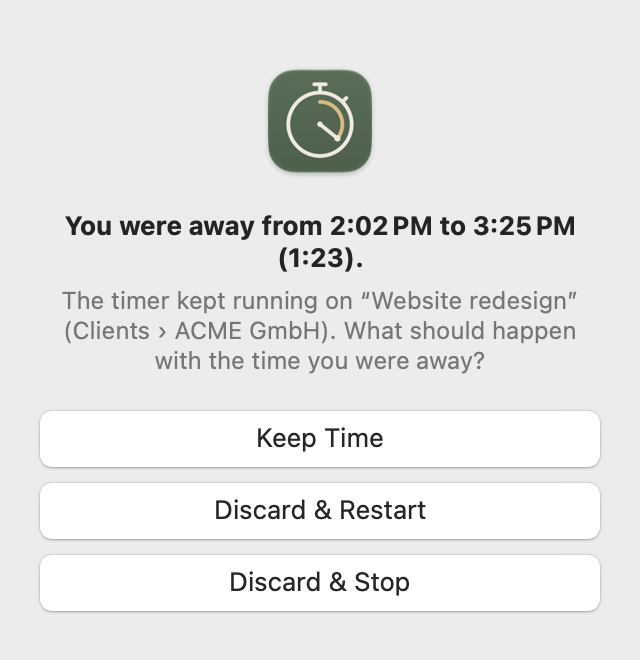
When you come back from a break, Freelime tells you how long you were gone and asks what to do with that time. Keep it, or cut out exactly the time you were away. The work before and after your break still counts.

  • Three choices: Keep Time, Discard & Restart, or Discard & Stop.
  • Sleep and a locked screen count as time away too.
  • Set the idle timeout from 5 to 60 minutes, or turn it off.
  • If Freelime quits unexpectedly while timing, the session ends when Freelime was last known to be running, not hours later.
Freelime's idle alert asking whether to keep or discard the time you were away.

Reports

Check every day before it goes on an invoice.

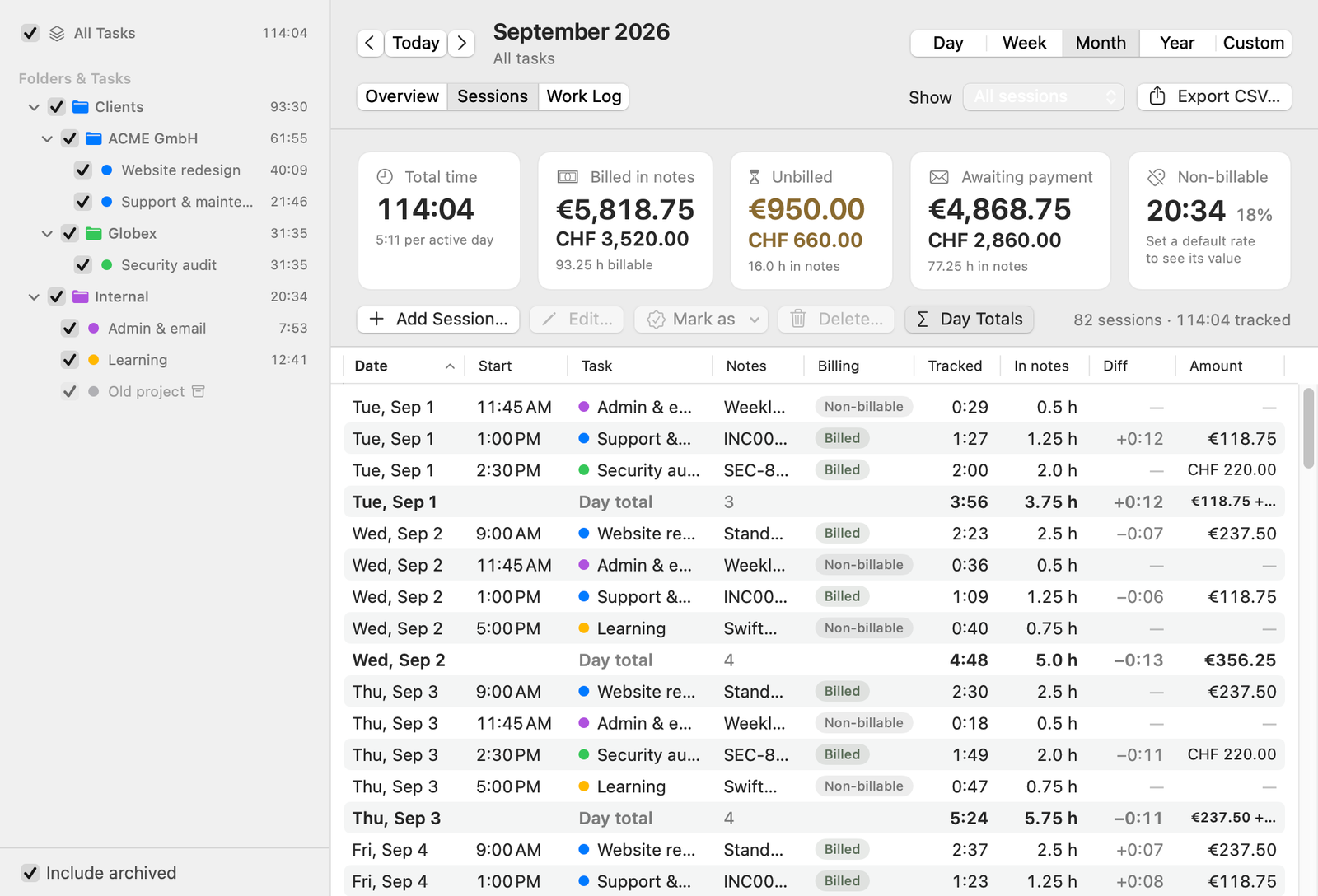
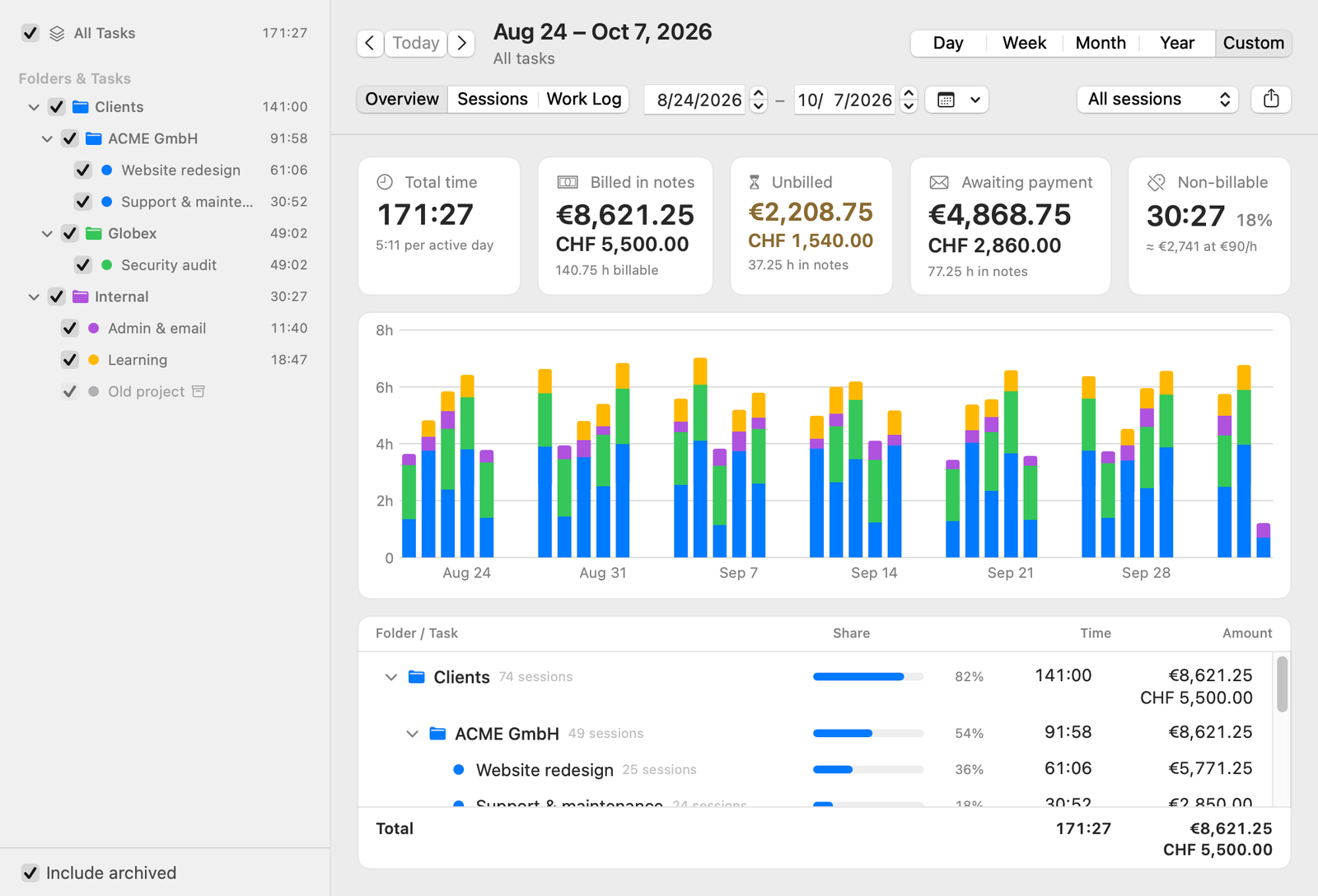
See any day, week, month, year or custom range: a chart, time and amounts per project, and every session in a table you can edit. Turn on Day Totals and each day ends in a total row with the time tracked, the hours in your notes, the difference and the amount.

  • Overview cards for your billable hours, Unbilled, Awaiting payment and Non-billable.
  • Sort by the difference to find sessions whose notes are missing hours.
  • Double-click a session to change its task, times, notes, rate or status.
  • Export to CSV (UTF-8, so accents and umlauts survive in Excel and Numbers).
Freelime Reports showing sessions grouped by day with a bold total row after each day.

Work Log & client summaries

Send your client a clean summary, not a spreadsheet.

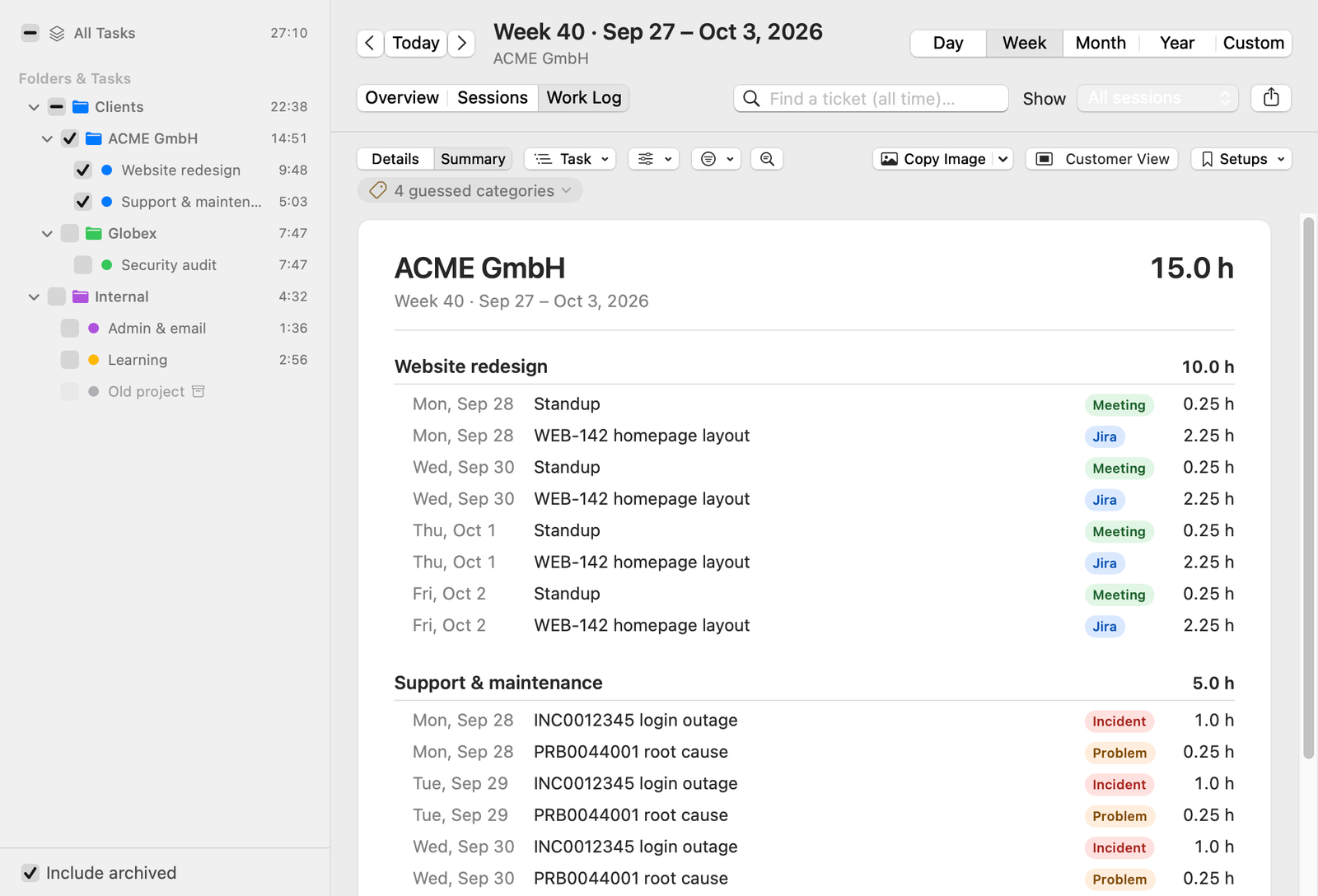
The Work Log groups your entries by ticket, ID, project, task, category, day, week or month, with an optional second level. Switch to Summary and the period becomes one clean card: groups with subtotals, each entry with its date and hours, and a total.

  • Copy Text pastes as a formatted table into Mail, Outlook and Teams.
  • Copy Image, Save Image, or Save as PDF on A4 pages with page numbers. Add your name once in Settings and it appears at the foot of images, PDFs and copied text.
  • Amounts and categories are optional. Rates and tracked time never appear on the summary.
  • Save a setup like “ACME weekly” and get the same view of the latest week back with one click.
  • Customer View fills the window with just the card, ready for a screenshot.
A Freelime Work Log summary for ACME GmbH, week 40, grouped by task with subtotals for each task.
The same summary exported as an image: entries with dates, categories and hours, and a total of 15.0 hours.

ID budgets

Your client's budget sheet, counted as you work.

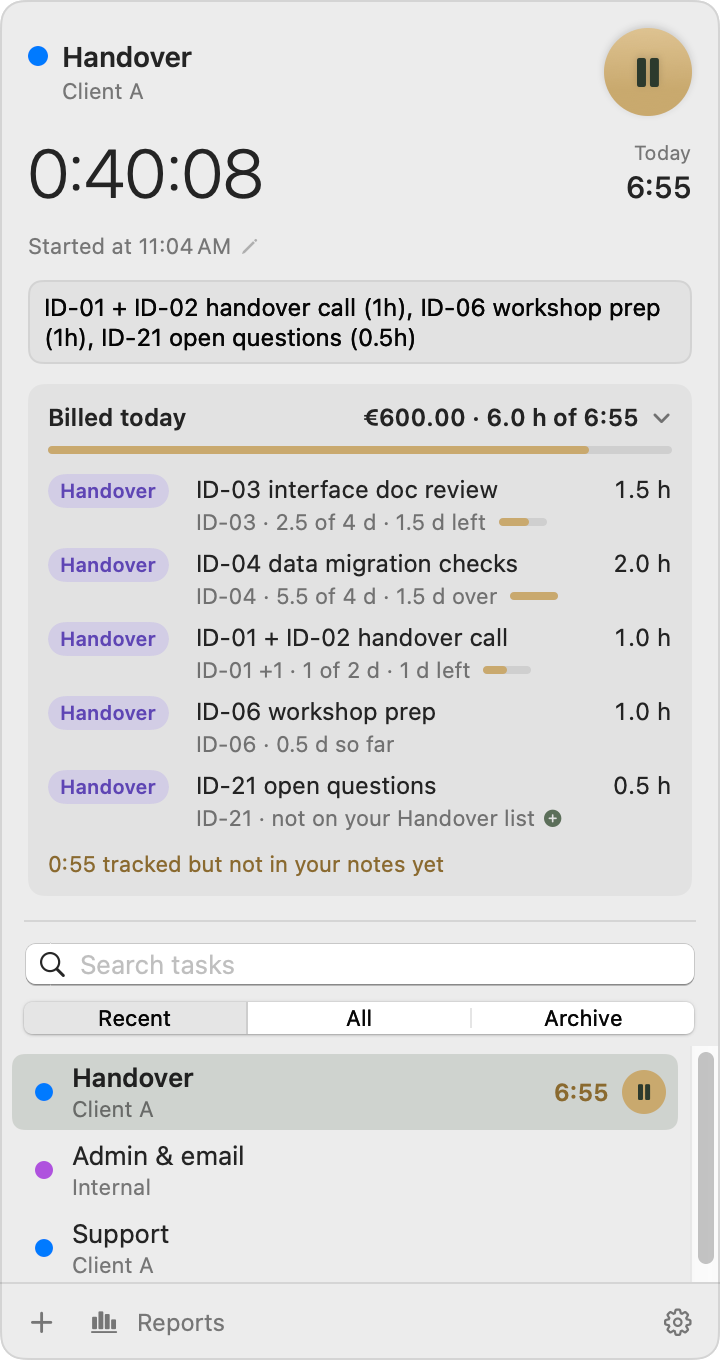
Some clients hand you a list of IDs, each with a topic and a budget. That's common in handovers and fixed-scope work. Paste the list from Excel once. Freelime then finds those IDs in your notes and counts the hours against each budget, in days, hours or money.

ID-03 interface doc review (1.5h), ID-01 + ID-02 handover call (1h),

  • See it while you work: “ID-03 · 2.5 of 4 d · 1.5 d left”.
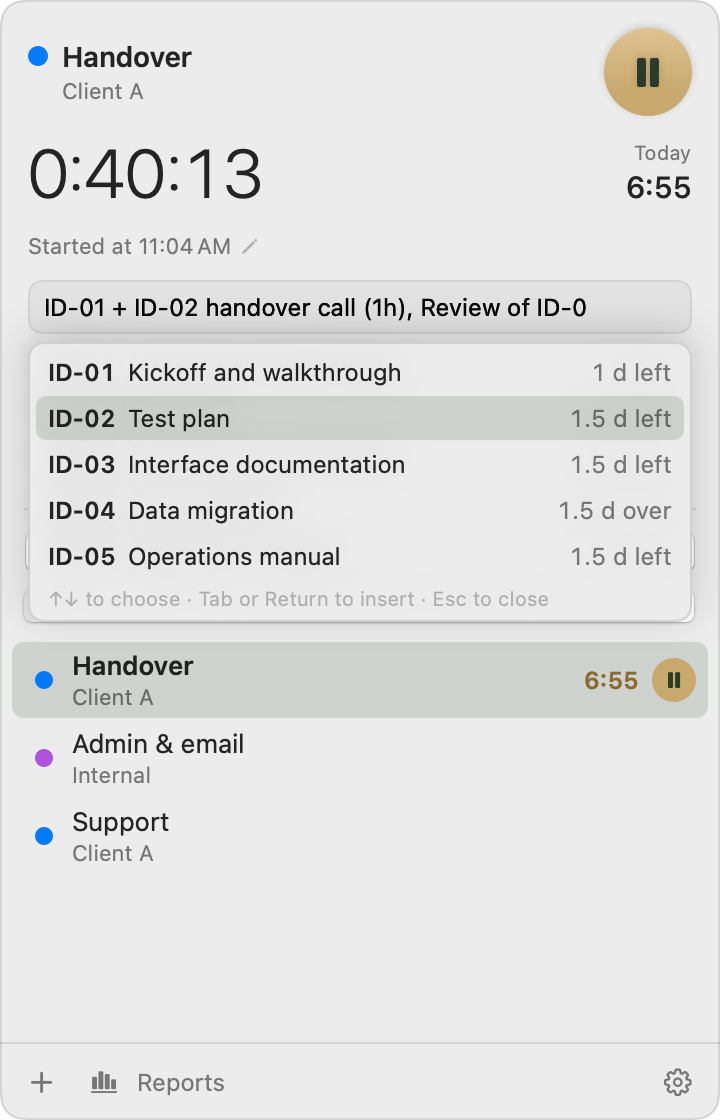
  • Freelime suggests matching IDs as you type one in your notes.
  • Get a notification when an ID reaches 80% or 100% of its budget (you choose the levels).
  • Copy as Table puts ID, topic, budget, used and left back into the client's sheet.
  • Only billable work uses up a budget.
  • An ID that's also a ticket number, like an INC0012345 from the client's sheet, counts toward the budget and stays a ticket.
  • For a repeating handover or a monthly round, “Archive and Start Again” closes the old round and starts the next one with the same IDs from the day you choose. Earlier entries stay with the old round.
Freelime panel while working on Handover for Client A: each entry in Billed today shows its ID's budget, for example ID-03 · 2.5 of 4 d · 1.5 d left, and ID-04 1.5 d over. Typing ID-0 in the notes: Freelime suggests ID-01 to ID-05 with each topic and what's left of its budget.

Rates, currencies & billing status

Know what's unbilled, what's billed and what's paid.

Give each client project its own hourly rate and currency. Every session keeps the rate it was recorded with, and amounts in different currencies are never mixed or converted: €1,200.00 + CHF 300.00. Sessions move from Unbilled to Billed to Paid, with dates.

  • Bill your tracked time, or the hours you write in your notes, like “(1.5h)”: as your default, or per project or task. Changing it asks whether unbilled sessions follow; billed and paid ones never change.
  • Mark as Billed on a date, on the last day of each session's month, or on day N of the next month.
  • Mark as Paid records when the payment came in, for one invoice or a whole history at once.
  • Awaiting payment shows what's billed but not paid yet, over all time by default, so an open invoice never drops out of sight. In Settings, any overview card can count all time too.
  • Non-billable time, such as customer acquisition, gets its own card with a rough estimate of what it would be worth.
  • Re-price sessions after a rate change, with a preview and a backup first.
Freelime Reports overview with cards for billed, unbilled, awaiting payment and non-billable time in euros and Swiss francs.

Privacy & backups

Your data stays yours.

Freelime keeps everything in a database on your Mac. There's no account and no Freelime server for your data, and the app as it is today makes no network connections of its own: no analytics, no tracking, no update checks. If Freelime is released as a paid app, it's planned to check its subscription online about once a day, without sending any of your time-tracking data (how the license would work). It backs itself up automatically to a folder in your own iCloud Drive (so Apple's iCloud stores the backups), or to any folder you choose.

  • Backups run about once an hour while your data changes, after an import, and when you quit.
  • Every backup is a complete copy. All backups from the last two days are kept, then one a day for 30 days (you can change this) and one a month after that.
  • On a new Mac, Freelime finds your backups in iCloud Drive and offers to restore everything. Backups in another folder can be restored from Settings.
  • Freelime writes a safety copy before restores, imports, large bulk changes and database upgrades.
  • Settings shows whether the latest backup has reached iCloud, and Freelime notifies you if a backup fails.
Your Mac Freelime's database
iCloud Drive › Freelime Backups or any folder you choose

Which backups are kept

  1. Last two daysevery backup
  2. Up to 30 daysone a day (adjustable)
  3. After thatone a month
  • No account
  • No Freelime server for your data
  • No analytics or tracking
Freelime keeps its database on your Mac and backs it up automatically to a Freelime Backups folder in your iCloud Drive, or to any folder you choose. By default it keeps every backup from the last two days, one a day for 30 days, and one a month after that.

Also in Freelime

And the small things.

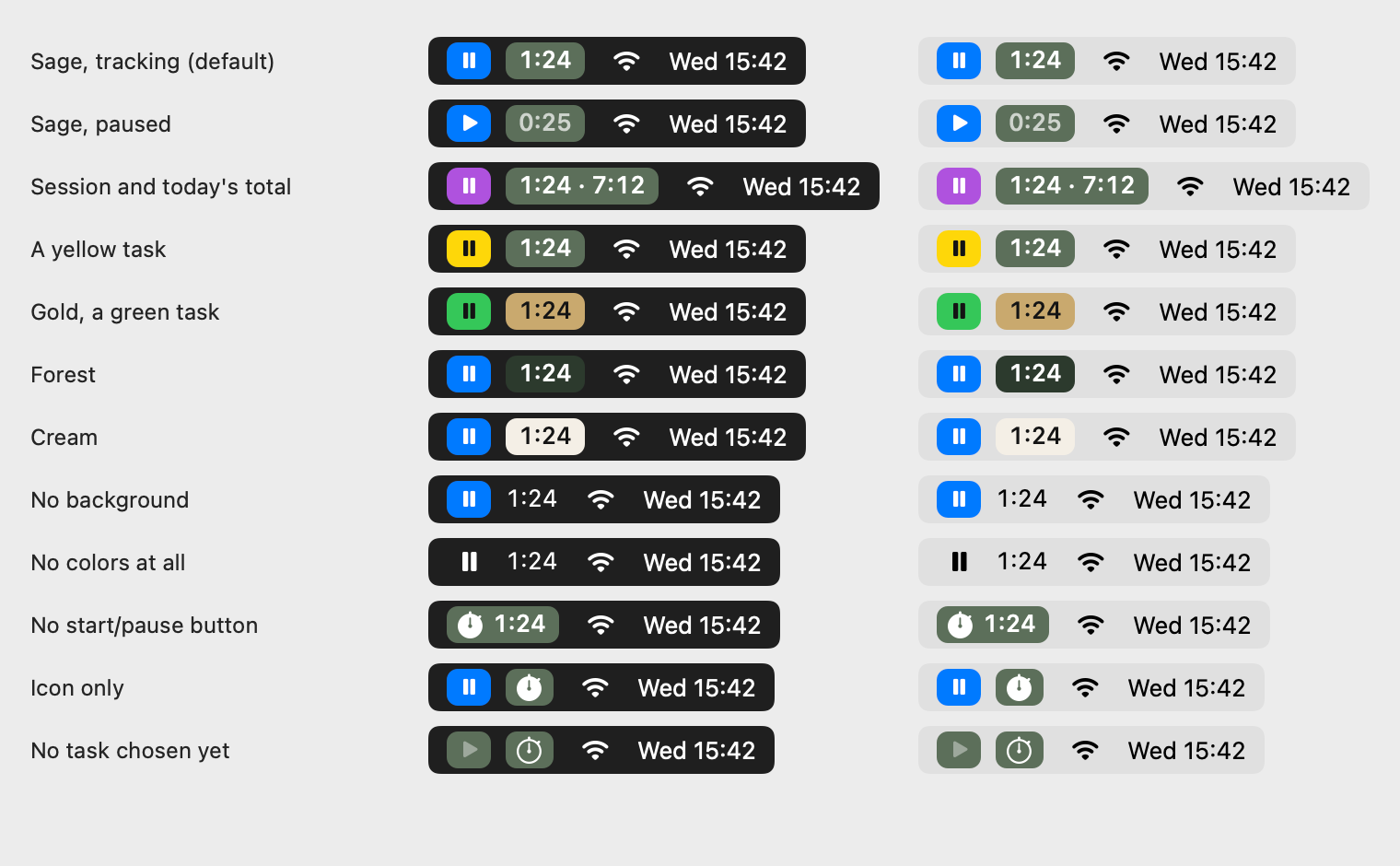
Freelime's menu bar styles on dark and light menu bars: sage, gold, forest and cream tiles, no background, no colors, no start/pause button, or just an icon.
Menu bar styles you can choose in Settings.
  • Global shortcuts to start, pause and open the panel
  • Round up, down or to the nearest step, from 1 to 60 minutes
  • Drop short sessions: under 5, 10 or 30 seconds, or under a minute
  • Menu bar shows the session, today's total, both, or just an icon
  • Menu bar and task colors, or plain like other menu bar items
  • Your own categories, with colors
  • Find a ticket across all time
  • Folders, tasks and an archive
  • Light and dark mode
  • CSV export of sessions and entries
  • Launch at login, with no Dock icon unless you want one

Made for our own client billing first.

Freelime is made by E.S.M.H Consulting FZE. We built it for our own client billing, and we use it for exactly that every day. Before deciding whether to sell it, we want to know whether other people need it too. That's what the waitlist is for.

Not on sale yet. Whether it will be depends on how many people want it.

Join the waitlist

FAQ

Questions

How much will Freelime cost?

The price hasn't been decided. If Freelime is released, it's planned as a subscription sold through Whop: monthly, with a cheaper yearly option. The sign-up form has an optional question about what you'd pay, and the answers help set the price. Joining the waitlist is free and doesn't commit you to buying.

How will the license work?

Planned, not built yet: if Freelime is released, the paid app would check your subscription online about once a day, sending your license key, a random device ID (created on first launch, not a hardware serial number) and the app version over HTTPS to our own server at freelime.app. That server asks Whop whether the subscription is active and answers with a signed reply that stays valid for about 14 days, so Freelime keeps working offline in between. No time-tracking data, notes, names or amounts are ever sent, though our server and Whop see your IP address as part of the connection. If a subscription ends, you can still view your data and reports, export it and use your backups; only new tracking stops. We plan to allow 2–3 Macs per subscription, and the Privacy notice will have the details before release.

What does joining the waitlist mean?

It tells us you'd like to use Freelime. The app exists and is in daily use, but it isn't for sale. Whether it's released as a paid Mac app depends, among other things, on how many people sign up. If it is, we'll email you before it's available. Details in the waitlist terms.

When will it be available?

There's no date, and it isn't decided yet whether Freelime will be released. That depends, among other things, on how many people sign up. If you join and it is released, you'll hear about it by email.

Is it Mac only?

Yes. Freelime is a native Mac app that lives in the menu bar. There's no Windows, web or iPhone version. If and when it goes on sale, the system requirements will be announced first.

Where is my data stored?

On your Mac, in a local database. Freelime has no account and no server of its own for your data, and the app as it is today makes no network connections: no analytics, no tracking, no update checks. A paid version is planned to check its subscription online, without sending your time-tracking data (see How will the license work?). Backups go automatically to a folder in your own iCloud Drive (so Apple's iCloud stores them), or to any folder you choose. You can also export your sessions and note entries as CSV.

Do I have to write hours in my notes?

No. By default, Freelime bills your tracked time. If you'd rather bill what you write, turn on “Bill the hours written in notes” in Settings, for everything or just for some projects or tasks: then hours like “(1.5h)” in your notes are what you bill, and the timer is your check. Ticket hours and ID budgets always come from entries that have hours.

Does it only work with Jira and ServiceNow?

No. Jira keys and ServiceNow numbers are recognized from the start. For another system, add a ticket category in Settings: give it a name and an example code such as SR-12345, and Freelime works out the pattern from it. Its codes then count as tickets in the Work Log, in Find a ticket and in the entries CSV. If a change would give existing entries another category, Freelime asks whether to apply it to unbilled entries only (the default, so billed and paid entries keep their category) or to all entries.

Does Freelime write invoices?

No. It keeps track of what's billed and paid, and gives you summaries, PDFs and CSV exports to build your invoice from. You write the invoice itself in your accounting tool.

I use Klokki. Can I bring my data?

Yes. Freelime imports a Klokki database or .klokup backup: folders, tasks, sessions, notes, hourly rates and billing status, and Klokki's settings if you want them. It shows a preview first, and Klokki's files are copied and never changed. Coming from Toggl Track, Clockify or Harvest? Freelime also imports their CSV exports, recognizing each one on its own, and any other CSV works once you say what each column holds. Before an import, Freelime saves a backup of the data it already holds, and “Undo This Import” removes the folders, tasks and sessions it added (Klokki settings you took over stay). Freelime is an independent app and isn't affiliated with Klokki. More in Switching from Klokki.

Is it for teams?

No. Freelime is made for one person, and it doesn't sync between Macs or people.

Waitlist

Want Freelime on your Mac?

Freelime isn't on sale yet. Whether it's released as a paid Mac app depends, among other things, on how many people sign up. If it is, you'll hear about it by email. Joining is free and doesn't commit you to buying.

Join the waitlist

  • Your email address
  • Optional: what you use for time tracking today
  • Optional: what you'd pay for Freelime

Opening the form loads it from Whop (USA). Whop and its service providers, such as Stripe, hCaptcha and Sardine, then receive your IP address and device data. Whop and these services store identifiers in your browser (cookies and local storage, some kept up to 2 years), and Whop records usage events about the form. By clicking, you agree to this. Details in our Privacy notice.

Sign up on Whop (opens in a new tab)

The sign-up form opens on whop.com, where Whop's terms and privacy policy apply. Details in our Privacy notice.

Prefer a new tab? Sign up on Whop (opens in a new tab)

The form is provided by Whop. What you enter goes to Whop, which stores it for us; we use it as described in our Privacy notice and Waitlist terms. Whop's own use of it is covered by Whop's privacy policy (opens in a new tab), and signing up through Whop means accepting Whop's Buyer Terms of Service (opens in a new tab).

Changed your mind? Email freelime@esmhconsulting.com and we'll remove you.