Guide for consultants · Not on sale yet

Track hours per Jira and ServiceNow ticket.

Freelime is a Mac menu bar time tracker for freelancers and consultants. It reads the Jira keys and ServiceNow numbers in your notes and adds up your hours per ticket. It needs no access to your client's systems.

Free to join. Freelime isn't on sale yet, the price isn't set, and it needs a Mac with Apple silicon.
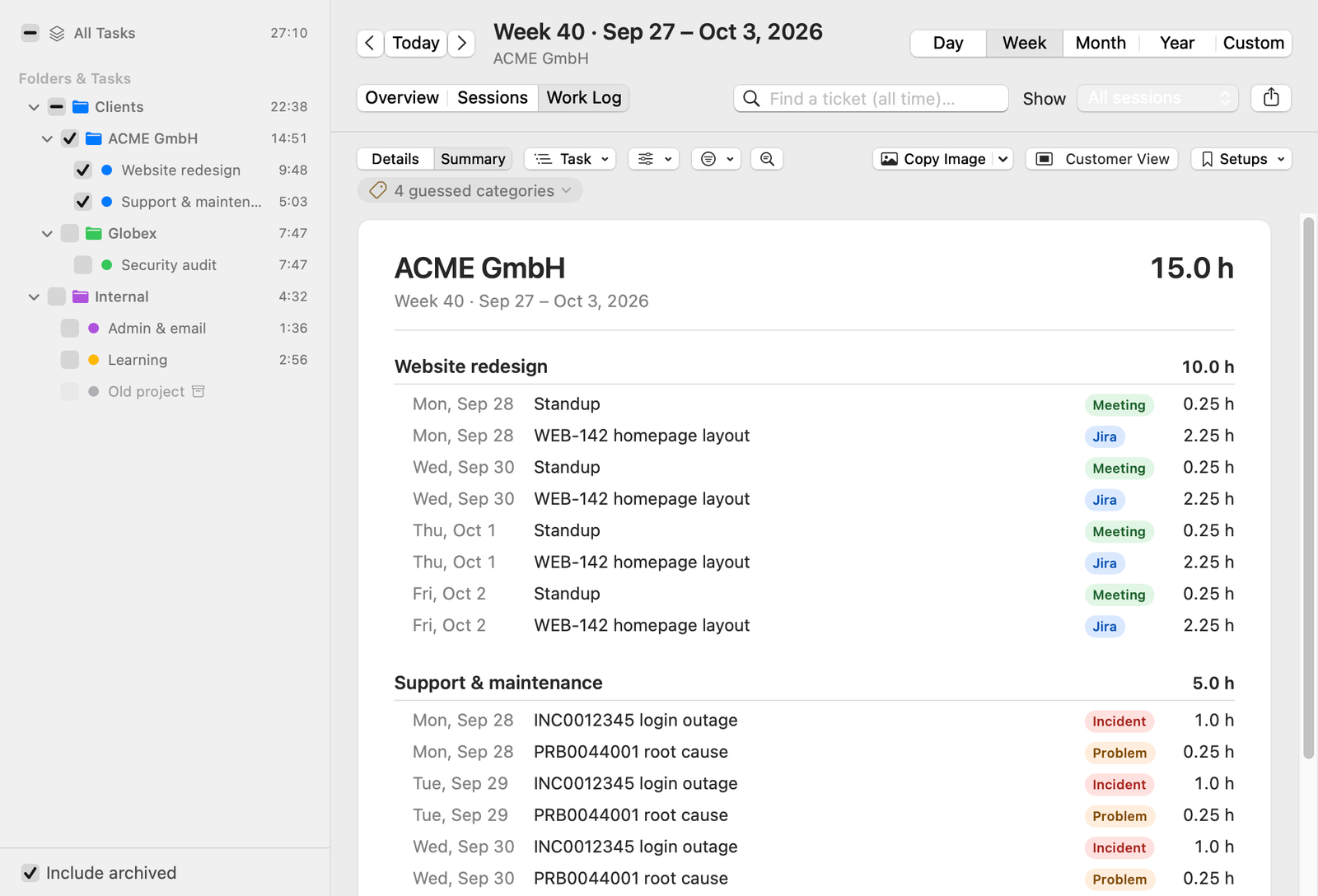
A Freelime Work Log summary for ACME GmbH: entries with their dates, ticket numbers such as WEB-142, INC0012345 and PRB0044001, a category for each and the hours. The names and numbers are sample data.

Work Log summary, grouped by task here. Choose Ticket to group by ticket. Sample data.

How it works

Hours per ticket in three steps.

Freelime isn't on sale yet. This is how the app works today.

  1. Start the timer

    Click start in the menu bar. Freelime doesn't track automatically: you start and switch the timer. Idle detection asks before counting time away.

  2. Write the ticket and the hours

    WEB-142 homepage layout (1.5h), INC0012345 login outage (1h),

    Add an entry per ticket in the panel's notes.

  3. Read the hours per ticket

    Reports › Work Log lists each ticket with its hours for any day, week or month.

Freelime reads your notes, not your client's system.

It doesn't connect to or sync with Jira or ServiceNow, and it needs no access to your client's systems. Nothing is sent to a ticket system or pulled from one. If your client also wants your hours in their system, you book them there yourself.

What it recognizes

Jira keys and ServiceNow numbers, as you write them.

The first ticket in an entry sets its category. Without a ticket, words like “meeting” or “standup” make it a guessed Meeting. Anything else is Other.

Jira keys

  • A project key in capitals, a hyphen and a number, like WEB-142 or ABC-1234. The category is Jira.
  • Look-alikes such as UTF-8 and ISO-9001 are left out. You can edit that list, or limit Jira to your own project keys.

ServiceNow numbers

  • Each prefix followed by at least five digits: INC (Incident), PRB (Problem), CHG (Change), SCTASK and TASK (Task), RITM and REQ (Request).
  • Upper or lower case both work: inc0012345 counts as INC0012345.

Hours per ticket

The hours go next to each ticket.

Write each entry with its hours in parentheses. Separate entries with commas or new lines.
  • (1.5h), (1,5h), (30min) and (1:30h) all work.
  • An entry that names two tickets, like WEB-142 + WEB-150 review (1h), gives each half the hours.
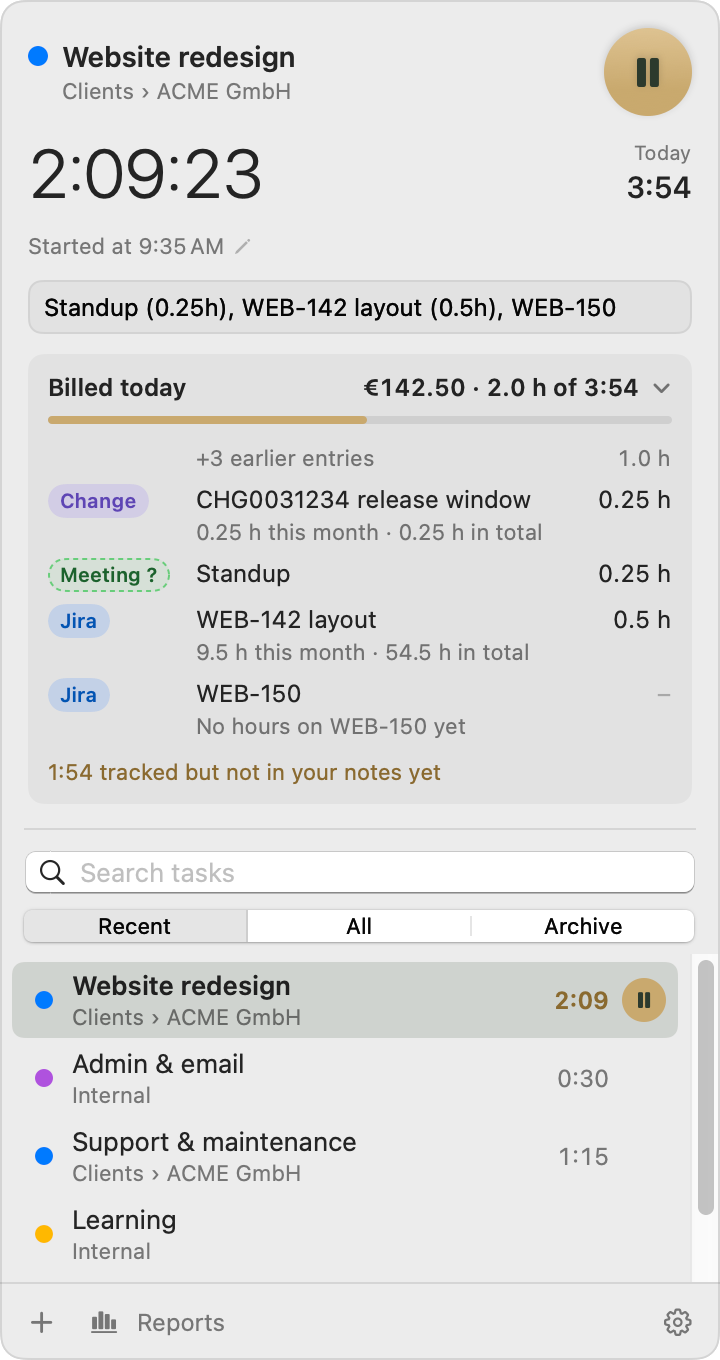
  • Billed today in the panel lists today's entries, with each ticket's hours this month and in total.
  • Ticket hours always come from entries that have hours, whether you bill tracked time or the hours in your notes. Freelime doesn't split tracked time across tickets.
Freelime's panel with Billed today expanded: entries such as CHG0031234 and WEB-142 with a category chip, their hours, and the hours on the ticket this month and in total. WEB-150 reads 'No hours on WEB-150 yet'. Sample data.

Billed today in the panel. WEB-150 has no hours yet. Sample data.

Categories

Categories you can change.

Built in: Jira, Incident, Problem, Change, Task, Request, Meeting and Other.

Change the built-in ones

  • Rename and recolor them in Settings › Categories.
  • Switch one off, or change which codes and words it picks up.
  • A category you pick by hand always wins.

Add one for another system

  • Name it and give an example code such as SR-12345. Freelime works out the pattern, and its codes count as tickets everywhere.
  • If a change would give existing entries another category, Freelime asks first. By default, billed and paid entries keep theirs.

Work Log

Every ticket, in the Work Log.

The ticket list

  • Each ticket with its category, hours, entries and last day worked.
  • Entries without a ticket land in a Without Ticket row.
  • Group by ticket, project, task, category, day, week or month, with an optional second level.

Find a ticket (all time)

  • Press ⌘F and type part of a number.
  • It shows everything ever billed on that ticket: its total, hours per month and every entry.
  • Export that history as CSV from the same view.

ID budgets

If your client gives you a list of IDs.

Some clients hand you IDs with a topic and a budget each. Paste the list from Excel once, and Freelime counts the hours in your notes against each ID, in days, hours or money. Group by ID in the Work Log shows each budget, what's used and what's left.
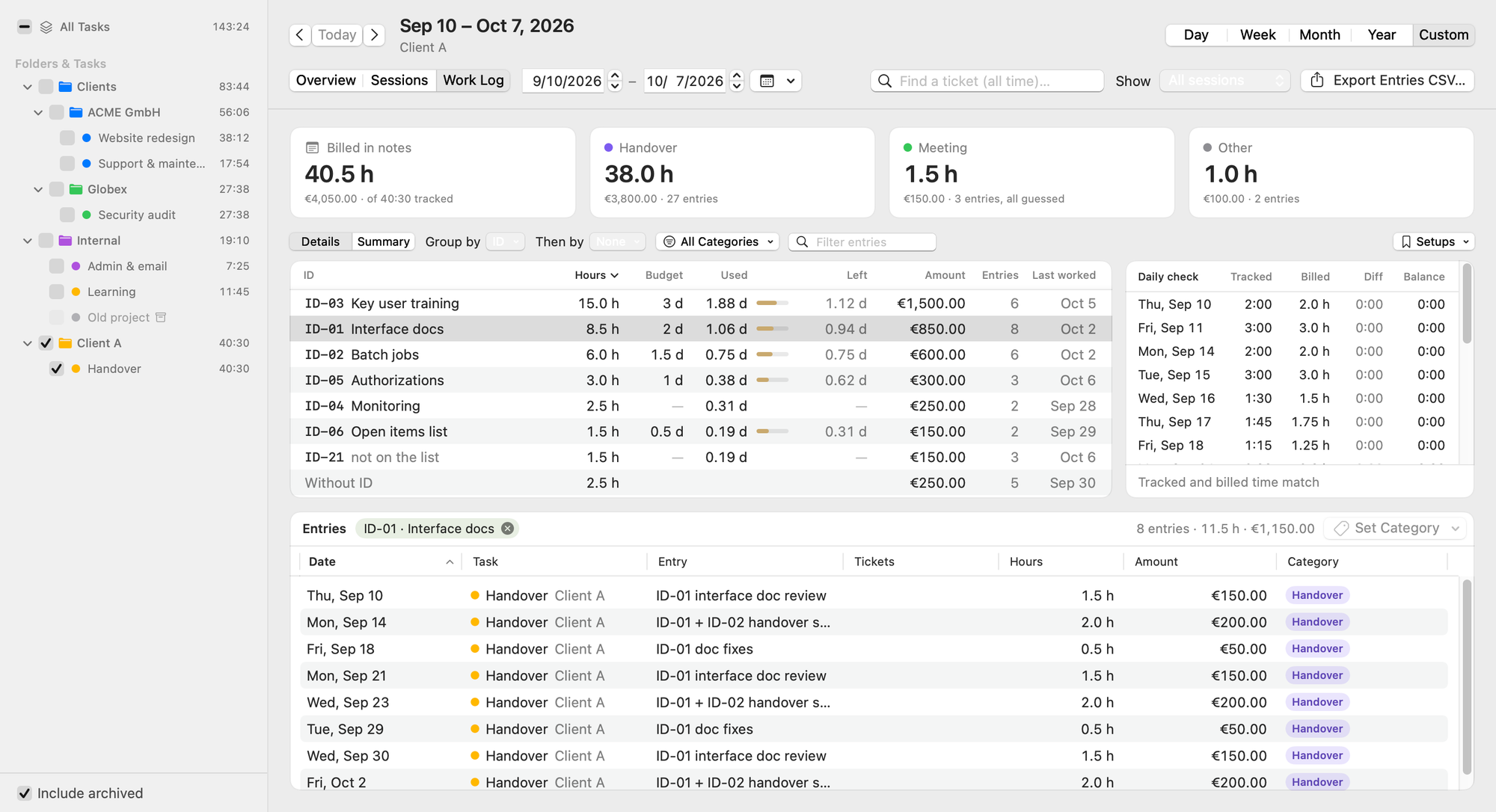
Freelime's Work Log grouped by ID: each ID with its topic, hours, budget, what's used and what's left, and the day it was last worked. The IDs and budgets are sample data.

Work Log grouped by ID. Sample data.

Client summary

Send your client hours per ticket.

One card for the period

  • In the Work Log, switch to Summary and choose Group by Ticket. More in Client time summaries.
  • Each ticket gets a subtotal and its entries with dates and hours. The card ends with a total.
  • Amounts are optional. It never shows your rates or tracked time.

Send it your way

  • Copy Text pastes into Mail, Outlook and Teams as a formatted table.
  • Copy Image, Save Image or Save as PDF (A4, with page numbers).
  • Save a setup like “ACME weekly” to get the same view back in one click.
  • Export Entries CSV… writes one row per entry with a Ticket column. It also has rates, amounts and billing status, so check it before it goes to a client.

Good to know

Where your notes live, and what you need.

Your notes stay on your Mac

  • They're in a database on your Mac. Freelime works offline, with no account and no server of its own for your data.
  • Backups go to your own iCloud Drive or a folder you choose.
  • A paid version is planned to check its subscription online, without your time-tracking data. See How will the license work?

Before you join

  • You need a Mac with Apple silicon (M1 or later). The minimum macOS version will be announced before release.
  • It's made for one person and doesn't sync between Macs or people. It doesn't write invoices.

Waitlist

Want Freelime on your Mac?

Freelime isn't on sale yet and the price isn't set. If it's released, it's planned as a subscription: monthly, with a cheaper yearly option. Joining is free and doesn't commit you to buying.

Join the waitlist

The form has an optional question about what you use for time tracking today.